When your computerruns slowon the RAMforthe applications thatyourun thecoursewillmake youreallyannoyedthe computer willautomaticallyget thememoryfrom thehard driveof courseitdoes notwork optimallytoimprove overall performance.This wayalsoI've everdiscussedhereby using theVirtual memorystickbutthisis moresimplewaysyoucanuse oneof thewaysthat I writethis.
To overcomethis youcantrythe following trickforusers of Windows 7by usingReadyBoostisafeaturein Windowsthat usesflashmemory from aUSBflashdrivethat willhelpwhenyouwalkpast thecomputerRAM.
The wayyouplug theUSBflashdrive,afteryouinstalledthe USBthengotoMy ComputerinExplorerwindowthen right click ontheUSBFlashDrive
Note: ifthere is a fileonyour USBAutorunthenReadyBoostshould bethe mainmenjadipilihan
RightclickonyourUSBflashdrivethenselectPropertiesPropertieswindow will appearin the windowmenuselect theReadyBoosttab
OptimizedUsingreadyboostReadyBoost toimprovecomputer memoryandakemudianselecttheUse thisdeviceandpleaseset thespacetoreservethespaceyou want to useUSBRecommendsnoticeonyour USBspaceandclickOK.
Notetouse this waytomake sureyour USBpossessa minimumcapacity of1 GB,for best resultsif you use2 GBof RAMonyourcomputercanuse aUSB flashdrive 2times theRAMon your computertoget better results.
Another trick that appeals to you if you facebook users, you can do video chat with your friends is the condition of each user who wants to video chat on facebook have to install the extensions "Social Plus" to start a video chat.
Social Plus is an extension for Google Chrome browser, Firefox and Safari that allows you to enhance your Facebook profile by adding skins, backgorund picture, emoticons, status updates, colorful, not like the buttons and more.
Also supportskeyboardnavigation,slideshowalbumandwhenyoudo notlike thestatusupdates,then automaticallyaddsthe "IDislike!"textin thecomments box,soyoucanIDislike!bypressingthe enter keyto postcomments.
Afteryouhave installed the extensionof SocialPlus,ifyourestartyourbrowserifyourusersFirefox usersChromeorSafariyou can justrefreshyour facebookpage.
You can download the tool for video chat on facebook here : http://www.social-plus.net/en/
Mostvideostreamingbroadcastonthe Internetcan not berecordeddue to varioustechnical reasons.Youaredoingstreamingvideorecordingis certainlyintendedtoreturnlatertoviewmovie trailersorimpressionsotahragayou justseeviathe Internet, soyounolonger need to fearlosingthe moviefilesfromthe Internetbecauseyou'verecorded itin thehard driveYou.
Toperformthese activitieswithresultsandgood picturequalitywithout being influencedby theshapeof the monitor andso ononlyonesoftwaretoolthatis suitable forthisjob,namelyHyperCam(notincludedonthe CDbecause thelicensedshareware,butyoucandownloadatwww.hyperionics.com/downloads/HC2Setup.exeforfree version).
This tool isactuallyintendedtomake avideotutorialorpresentationsoftware,butthis toolcan also beusedforotherhatasdo thecaptureofvideostreamingfor example.Youcanuse thefree versionwithoutfear ofanyfeatures that areomitted,allfunctionslike afullversionnyabutwitha certaintime limit.A bitinconvenientisthisHyperCamrequirehighcomputerspecs,at leastyouset upa PCwith2GHzprocessorand512MBmemoryhigherthe better.Ifyouimpose,chances are youwillfeelyour computerwillrunveryslowand most likelywillstopworkingor"hang".
DRM-free songs can be downloaded from iTunes at a price more expensive, but it is usually the result of extraction (ripping) from the CD will be free of DRM as well. Make sure ripping made from legally owned CDs.
Not all people want to buy a ringtone for the iPhone. Many also want to make iTunes songs in his personal collection as a ringtone.
Before proceeding, please note that these tips are intended for beginners. These tips will utilize a collection of songs that have been owned and is in the iTunes Library. Songs that can be used in this tip is just a free Digital Rights Management (DRM)
Okay, here is a simple way to get free ringtones on the iPhone by exploiting a collection of songs in iTunes:
1. Open iTunes 2. Find songs in iTunes collection who want to be a Ringtone 3. Listen to the song, and find the part you want to use. 4. Record the start time and end of pieces of the song, for example 1:00 to 1:40. (Maximum length 40 seconds) 5. Right click the song title and choose 'Get Info' 6. Click the tab 'Options' 7. Enter the beginning part time who want to take on the Text Box 'Start Time'. For example, 1:00 8. Enter the end time on the Text Box 'Stop Time'. For example, 1:40 9. Click OK 10. Right-click again the title song and select 'Convert to AAC' 11. If successful, it will show duplicate songs in iTunes with a shorter duration 12. Right-click on the results of earlier pieces and select 'Delete' 13. On the menu that appears select 'Keep Files' for iTunes does not remove the song from the hard drive 14. Open the file location before, usually in the folder 'Music> iTunes> iTunes Music' (or like) in a folder with the name of the singer / music group 15. Right-click the last file and rename it with the suffix. M4r (original file will have the suffix. M4a) 16. Double-click the file that has changed akhirannya. iTunes will add the file into its Library. 17. Connect the iPhone and do Sync Ringtone
Widely available on YouTube video clips of music tracks from various artists. In fact, the Google owned video sharing site that has made a special page on YouTube.com music / music.
But, not all the clips showing the lyrics of the song is displayed. Yet sometimes when watching music clips, there is a desire to participate singing.
Now, the desire for a karaoke that can be realized easily via an extension for Firefox.
Extension was called Scrolling Lyrics Player (SLP). But may also be referred to as KaraoBird accordance with the engine used on the back.
SLP installation steps KaraoBird:
1. Visit SLP Add-On at Mozilla.org 2. Click Add To Firefox 3. In the window that appears select Install 4. Restart Firefox will ask to enable SLP
How to use the SLP:
1. Visit YouTube.com / Music 2. Find a music video that wants to sing 3. Automatically on the video page will appear a box containing the lyrics 4. Adjust the offset (plus or minus) at the beginning of the song by scrolling the mouse over the box lyrics 5. Sing as we pleased.
Note:
1. Song Lyrics taken from the site YouTubeLiric.com 2. Synchronize songs with lyrics not going as smoothly as a professional karaoke video 3. Adjusted synchronization with the video being played, if video is not finished buffering lyrics will go stagnant 4. For popular songs SLP KaraoBird not much trouble, is somewhat different to the tune of 'rare' 5. SLP is based on KaraoBird, an add-on for Songbird (Open Source software to play music).
Social media era has arrived. Everyone connected with each other via their respective handsets. As a result of Facebook, Twitter, and Foursquare could be creatively used to apply for the girl's idol.
Romantic things done by Matt Van Horn, one of the developers on social sites Digg. He gave a surprise heart idol girl he wanted to marry, to maximize the number of social networking sites such as Foursquare, Twitter, Facebook and assisted Qik for live streaming video.
For information, Qik is a video streaming service that can be directly recorded through the phone. As a result, people who turn on Qik can directly show what he recorded via mobile phone in real-time, witnessed by many people.
Armed with Facebook, Twitter, Foursquare and Qik, Van Horn was applying for her hero on the hill. The idea is simple, Matt led the girl to the top of the hill, while he hid behind a rock.
Not far from the site, Matt's friends are a valuable record of events in a candid, and broadcast live via Qik. It is intended to allow families of both parties witnessed Matt's romantic action.
Now, before Matt using Twitter and Foursquare as a 'material proposal'.
Tips valuable experience that he told through his personal blog.
How?
The idea is simple. The first time Matt was hiding behind a rock, and recorded with the iPhone live streaming via Qik. The event that lasted 30 minutes that he was sent to all relatives and friends without the knowledge of the girl. So they can see it directly.
Well, shortly before Matt had told the girl hero who do not know his plans to the location. When the girl arrived at the hill, Matt, who was then in hiding immediately send 'marriage proposal' that he would propose on the spot via a direct Foursquare synchronized with Facebook and Twitter.
Status Matt is what makes the girl happy shock. "While applying for my dream girl. @ Lolofishyfoo directly witnessed a live stream: http://j.mp.mvhlolo (@ Bernal Heights Park)," he wrote on the link Foursquare, which is directly on the Re-Tweet by his friends.
Every girl would love to surprise. Especially when he knows that all the people witnessed the happy event without realizing. Herein lies the romantic emotions for the girls. Only armed with a single click on the status of Foursquare, big plans are successful.
Want to try? Or already have other creative ideas with Facebook, Twitter, or Foursquare to do the same?
When YOU at home has more than one computer, and each computer wants to connect with each OTHER to get sharing data, printers, internet connection sharing etc, we can do to make your computer network LAN (Local Area Network) simple ..
this time we use a cable connection that is using a data cable UTP (unshielded twisted pair), which is standard LAN cable for network connection. Computers are used at present are already equipped with LAN Card or also known as NIC (Network Interface Controller), or Ethernet Card.
If the number of computers that will be connected only two, we just simply providing a single UTP cable with a length according to the distance between the computer that at both ends of the cord that has been fitted with RJ-45 connector (standard connector for UTP LAN cable) and with the configuration Cross / cross.
If the number of computers that will connect more than 2 pieces, then we must add a device called the Switch or Hub. At the current price of a home-based switches to the standard is very affordable. From each - each computer connected to the switch using UTP cable with RJ-45 connectors at both ends with a configuration Straight / straight. Installation of connectors on UTP cable can be made yourself, but to simply just go to a computer shop that also provides network equipment, and living told to buy a pair UTP cable connectors with the configuration of all the cross / cross to connect the computer to the computer (two computers) , or straight / straight for more than 2 computer connections / use the switch.
Configuring the IP address (Internet Protocol / TCP IP) To be able to communicate with each other, respectively - each computer must be given the IP address
• Go to Network Connections (Start -> Control Panel -> Network Connection) • Select / double-click Local Area Connection • Double click on Internet Protocol (TCP / IP) • Click Use the Following IP address, then fill in the IP address and Subnet Mask For example, komputer1 IP Address: 192.168.0.1 komputer2 IP Address: 192.168.0.2 komputer3 IP Address: 192.168.0.3 komputer4 IP Address: 192.168.0.4 etc. .. Must be the same Subnet Mask: 255.255.255.0
To determine success or failure of connection do the ping command from one computer to another computer Example of komputer1 to komputer2: • In Komputer1: Click Start -> Click Run -> type CMD -> click OK, then the Command Prompt window will appear • Type in ping 192.168.0.2 hit enter Reply from komputer2 there should be • Perform the same command to find a connection to another computer.
1.Insert Windows CD in your cd-rom and start your computer
2. Keep your eye on the screen messages for booting to your cd Typically, it will be “Press any key to boot from cd”
3.Once you get in, the first screen will indicate that Setup is inspecting your system and loading files.
4.When you get to the Welcome to Setup screen, press ENTER to Setup Windows now
5.The Licensing Agreement comes next - Press F8 to accept it.
6.The next screen is the Setup screen which gives you the option to do a Repair.It should read something like “If one of the following Windows XP installations is damaged, Setup can try to repair it”Use the up and down arrow keys to select your XP installation (if you only have one, it should already be selected) and press R to begin the Repair process.
7.Let the Repair run. Setup will now check your disks and then start copying files which can take several minutes.
8.Shortly after the Copying Files stage, you will be required to reboot. (this will happen automatically – you will see a progress bar stating “Your computer will reboot in 15 seconds”
9.During the reboot, do not make the mistake of “pressing any key” to boot from the CD again! Setup will resume automatically with the standard billboard screens and you will notice Installing Windows is highlighted.
10.Keep your eye on the lower left hand side of the screen and when you see the Installing Devices progress bar, press SHIFT + F10. This is the security hole! A command console will now open up giving you the potential for wide access to your system At the prompt, type NUSRMGR.CPL and press Enter. Voila! You have just gained graphical access to your User Accounts in the Control Panel.
11.Now simply pick the account you need to change and remove or change your password as you prefer. If you want to log on without having to enter your new password, you can type control userpasswords2 at the the prompt and choose to log on without being asked for password. After you’ve made your changes close the windows, exit.
hehe...it has beeen a long time not to post about free internet trick. For a meanwhile i just want to dedicate you the new internet trick from Telkomsel again since I was headache how to phreak indosat bug because indosat is difficult to phreak.
Ok here is the trick:
downloAad the file prov first for telkomsel. If you already have it, you don't need to download it. Now download Opmin 5 final handler.jarin this opmin 5 No need to set just use default settings. for downloading just add front-query> mini.opera.com mini.opera.com@">
happy free browsing......
NEXT TRICK
If the above describes my TELKOMSEL tricks with opmin 5, and many times I would describe TELKOMSEL trick with 4.2 opmin handler may glimpse this trick is not much different with the previous tricks, but the difference we will use the server opmin 5 opmin to server4.2,
Server > http://mini5.opera-mini.net:80
socket server > socket://mini5.opera-mini.net:1080
front query > mini5.opera-mini.net@
host >mini5.opera-mini.net:80@
TELKOMSEL bug is not full free. after using about 250mb, you can change OR BUY with new sim card of telkomsel again to browse free
mini.opera.com@">happy free browsinG... MORE TRICK AT WWW.FREEINTERNETTRICK.CO.CC
Telkomsel has a new bug for the free internet. This morning I tried to use the simpati card in mig33 v4.20 applications. Package FLASH (DAFTAR PAKET FLASH DULU) only cut 1 - 2 KB once connection.
Create a new gprs settings in hp you with:
name: it's up to you APN: telkomsel Proxy: 202.3.219.14 port: 80 others just emptied. NOTE: TRY DISCONECT AND CONNECT IT AGAIN IF YOU STILL CAN NOT ACCESS THE BUG.
Use the application that has a http protocol. Like mig33, opera mini, bolt, et FOR MORE INFORMATION, VISIT HERE: WWW.FREEINTERNETTRICK.CO.CC
For all those kaspersky fans who always missout the promotional offers of Kaspersky here is the latest promotional offer by which you can get free license key for 180days.
Again this program is for MSN users of china but you guys can also get a valid 180 days license key all you need is a MSN account, if you dont have plz create a new one its easy.
Unwanted images can crop up on your computer even with routine searches. To block pornographic material, many families have turned to software-based solutions. Software is expensive, requires updating and can be altered by computer-savvy children. Block porn and other harmful material from appearing on your PC and your home network by filtering all incoming Internet traffic before it reaches a computer.
Instructions
Step 1
Sign up for an account at opendns.com. DNS is a service that translates alphabetic web addresses into the numeric IP addresses your computer needs to connect to a website on another computer or server. Most ISPs (Internet Service Providers) designate a DNS service, but you can choose any service you want.
Step 2
If you don't have a router, go into your control panel on your Windows XP system and click on network connections. Select your connection and click on properties and then on Internet protocol (TCP/IP). Click on properties and select the radio button marked use the following DNS server address. In the preferred DNS server box put 208.67.222.222 and in the alternate DNS server box put 208.67.220.220 and press OK when you are finished.
Step 3
If you have a router, it is best to set the DNS settings on your router rather than on a computer. Routers filter the traffic before getting to your computer, which increases security. It also allows you to change settings one time, rather than on each computer on your network. Find the DNS preferences on your router and change them to 208.67.222.222 and 208.67.220.220 and save. You may need to reboot your router for the settings to update. Specific instructions for your router can be found on opendns.com.
Step 4
Select filter settings. Sign into your account on opendns.com and click on the settings section. Choose your desired level of filtering. To block porn and phishing (websites that attempt to gain your information through deception), select low. If you want to block pornography, phishing, adult sites and illegal activity, select moderate filtering. If you prefer to block all porn, illegal activities, video sites, social networking and time wasting websites, select high filtering. After selecting the radio button next to your desired filtering level, click apply.
Step 5
Block specific websites. If you have a specific website you always want to block, add it under manage individual domains. After you add the domain name to block, click add domain.
Step 6
Check settings. Wait two hours for your filtering and website blocking settings to be updated on opendns servers. After two hours, search for websites that should be blocked. You can search for general porn by putting free porn in a Google search and selecting one of the search results. If your settings are working properly, you should see a website that says: site blocked [website address] is not allowed on this network.
During this time of financial crisis you must have wondered if there was a way to make free calls so that you can reduce your cost of living a bit.Well we at cshared.com brings you with a new and cost free way of making calls to both local and mobile phones all over the world.Yep you heard it right and its totally FREE.
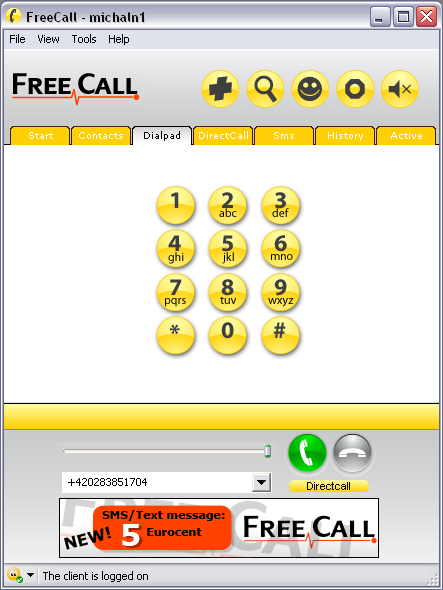
This program is called FreeCall.
Vist FreeCall to see whether your country is listed (almost all countries are listed there )
The best part is yet to come.We at cshared are going to exclusively announce the trick that you can implement to make the program give you more free calls.
THE TRICK: “FreeCall is still a Freeware app but you only get 300 minutes a week.To bypass this restriction:Keep the setup.exe. Freecall’s protection system is quite flawed, when the program announces you cannot use any more minutes = Uninstall and reinstall and it will reset your 300 minutes which only takes a moment.A)You MUST make an account with the program when it loads up. Then when your logged in (it will say at the bottom: ‘The client is logged on’Go to the dial pad TAB, ignore the on screen buttons, at the bottom type in your number and remember you need to add country codes at the beginning – NO spaces in the number either.C) And it does do all countries for free – i’ve used it from NZ to england, USA, Spain and Aussie and they used it back.D) If it didn’t work, you need to check your firewall settings etc, this is an obvious but a program like this needs full access.”
Here is a simple way to access Windows XP with Administrator rights and privileges if you have password protected your User account on your Windows XP system and can't remember the password(s) to login. Whenever Windows XP is installed on a system, it creates a default account called "Administrator" and by default this account is not password protected. Therefore, if you bought a brand name computer (such as Dell, HP, Compaq or Sony)or you have installed Windows XP yourself. You should be able to login to the computer through the unprotected Administrator account.
1.Reboot your machine.
2. Press F8 before the Windows boot screen appears. Do not press F5 as used on the NT/9x series of Windows. You will be be prompted with a boot options menu.
3.Select the Start Windows in Safe Mode option.
4. Click through several self-explanatory screens until your reach the familiar 'Welcome' screen. Note that this welcome screen is limited to 256 colors and 640x480 resolution because the primary graphics will have been set to the Windows Safe Mode software VGA adapter. You will not be able to change this mode even in Display options, while Windows is running in Safe Mode.
5.Find the icon for the Administrator user. If the default settings of your system haven't been changed, there should be no password for this account.
6.The Safe Mode Welcome screen might display some of the other users on your system.
7.Login as the admin.
8.Press Yes at the prompt asking if you would like to continue using Safe Mode.
9.Continue on to the User Settings control panel. Here you can change any of the other passwords for user on the machine. Make any changes you want.
10.Reboot your computer. As long as you don't press any keys (i.e. F8) during the boot-up the computer will startup normally.
11.Login as the user for which you set the password.
12.If it doesn't work above, you can try to use professional support recommendation OPHCrack (freeware) to crack your windows password without erasing anything.
Setting new password 1.Open the Control Panel.
2.Click the User Account.
3.Select the account you want to to set a new password.
4.Click changing Account and set up password, then fill out the form as listed. Click Create Password.
5.You now have a personal login ID and Password. No one has a right to login to your FOR MORE , VISIT HERE: WWW.FREEINTERNETTRICK.CO.CC
Firefox 3 about:config file is the core configuration file of Firefox. By editing about:config file we can get amazing hacks for Firefox 3. Firefox allows the users to change many preferences in the about:config file so it’s totally ethical to do it.Here is list of 21 Firefox 3 hacks & tweaks.
2) Location Bar (Set number Auto Complete URL at Address Bar)
This is a good hack to trim down that huge auto-complete list on your URL bar. By default it displays maximum 12 URL
browser.urlbar.maxRichResults = #
Enter Number at # (3,10,12 etc)
3) Stop Displaying Website Icon (Favicon) in Address bar & On Tab
browser.chrome.site_icons = False
4) Disable Prefetch (Helpful for frequent Google searcher, low-speed internet connection or low RAM)
network.prefetch-next = False
5) Extend Spell check to forms
layout.spellcheckDefault = 2 Change Value from 1 to 2
6) Disable Blinking Text
browser.blink_allowed = False
7) Speed Tweaks
network.http.pipelining false to true
network.http.pipelining.maxrequests 30 to 8
network.http.max-connections 30 to 96
network.http.max-connections-per-server 15 to 32
network.http.max-persistent-connections-per-server 6 to 8
network.http.pipelining.ssl false to true
network.http.proxy.pipelining false to true
( 75 is number of pixels to scroll at a time when scrolling the tab strip’s scrollbox. (Default: 20)
21) Auto Complete URL while You type at address Bar
browser.urlbar.autoFill=True
Many of above about:config hacks are available in Older Firefox Version, at the end if some thing goes wrong then feel free to restore your about:config to older setting see the below image of how to restore about:config
Hope you guys like this Firefox 3 hacks, If you have any tips or hacks related to Firefox 3 about:config, hacks, tweaks do let me know I will include it in above list.
FOR MORE , VISIT HERE: WWW.FREEINTERNETTRICK.CO.CC
This trick especially for those who use Telkomsel Flash!
The basis of this system is to find gretongan IP address & port that is open on Flash Telkomsel network. When we connected with FLASH Telkomsel network, each of us is given a unique IP Address. Because the use Telkomsel Flash is there are thousands, even millions of people, we could use the IP Address of others to be able to connect to the internet, and because we are just "passengers", then we will not be charged aka FREE!
Steps:
Previously prepared a cup of coffee / tea warm, trusss
1. Connect the network with T-Flash APN: FLASH username & password: (blank)
2. The next network scan process to find IP address & port that can be "boarded". We can only manually scan with Command Prompt (CMD) on Windows, but really old boss,. For convenience, we can use various software to scan the network. Software used is IpScan - 3.0 (requires JavaRuntimeEnvironment / JRE 5 and above). You can find this software through GOOGLE.COM 3. Kalo uda dapet IP Address & port that is open, change your browser settings network with IP address & port that you dapet earlier. How to return: >option>>advanced>>network>>setting" onmouseover="this.style.backgroundColor='#ebeff9'" onmouseout="this.style.backgroundColor='#fff'">* Through Firefox: tools- options- advanced- network- settings >internet option>>connections>>LAN setting" onmouseover="this.style.backgroundColor='#ebeff9'" onmouseout="this.style.backgroundColor='#fff'">* Through the Internet Explorer: tools- internet options- connections- LAN settings * Through Opera: xory dori str0beri, I krg tau, hehe (grinning m0de 0n)
NOTE: There is an easy way menggnti browser settings, we can use the software proxy switcher (also can be found in GOOGLE) FOR MORE , VISIT HERE: WWW.FREEINTERNETTRICK.CO.CC


 For all those kaspersky fans who always missout the promotional offers of Kaspersky here is the latest promotional offer by which you can get free license key for 180days.


 )
)